










Reduce digital signage costs
Solutions for Engaging Audiences
Real-Time Internal Communications
Display dashboards, reports, and content from leading integrations like:
- PowerBI, Tableau, Klipfolio Reports and Dashboards.
- Canva, MS Office, Google, Slack, MS Teams, Zoom and Social Media Accounts.
Interactive Enterprise Engagement
Built for schools, government agencies, and corporate environments, these solutions simplify access to important information.
Support dynamic content including directories, schedules, and self-service tools.
Modern Wayfinding Solutions
Improve visitor navigation while reducing the need for manual updates.
Operational Visibility That Drives Performance
Improve decision-making and navigation while reducing manual updates.
Real-Time Menu Updates
Use customizable templates or a professionally designed branded layout for your displays.
Integrations such as Square and Toast connect content with operations for a scalable menu solution.
Modern First Impressions
Deliver company news, event schedules, and directory information to keep visitors informed and engaged.
Streamline Courthouse Operations
With instant updates and remote management, reduce confusion, minimize errors, and improve transparency for visitors and guests.
Keep Travelers Informed
The #1 Digital Signage CMS
Create and publish content in minutes with no IT bottlenecks or complexity.
- Drag-and-drop content creation with curated templates and themes
- Remote monitoring and network control
- Scheduled content delivery for targeted messaging
- Offline playback to ensure continuous display uptime
- Free technical support via phone, email, and online knowledgebase
No-subscription Digital Signage
- One-time purchase with perpetual license
- Avoid recurring fees and long-term cost growth
- Add screens or locations without increasing monthly overhead
- Keep operational costs predictable and stable
- Every Mvix Digital Signage Player includes cloud-based Mvix Signage Software
Future-Ready Media Players
Seamlessly Integrated Solution
- Built-in Ethernet and wireless connectivity
- 3x HDMI, 2x network ports
- Small form factor (SFF) for easy installation behind displays
- Supports video walls and interactive touchscreens
- Offline playback for uninterrupted operation
How it works
Then, login to our secure Digital Signage CMS via a standard web-browser (e.g. Google Chrome) from any PC or Laptop from anywhere.
Once logged into the CMS, upload images, videos, audio, PDF, MS Office files or design your content and schedule playback across screens.


Success Stories from Our Users
"I would tell you to take a look at the Mvix display. They're easy to operate, easy to train people to operate."

"We're really looking forward to using Mvix on our campus to provide the backbone for all of our digital signage. We've found the product to be extremely easy to use."

"We were only looking for a product for one year and here we are five years later. We're happy with it and it just got adopted for an additional five colleges within the university."

"It's amazing! It's the first thing our visitors see when they come in. It allows us to show vividly what our wishes can do for a child when they have hope."

"We installed it and it was a complete success. Everybody was very happy with how easy it was to use the system and our marketing department liked how we were able to brand it so we could have a consistent theme."

.svg)



Partners
By partnering with trusted technology providers, we drive ongoing value and innovation for our clients.
Digital Signage FAQs
Can't find the answers you are looking for? Contact us now to get your questions answered.



Mvix makes content management fast, centralized, and scalable, ideal for both small teams and enterprise environments. With our easy-to-use Mvix Digital Signage Software, managing and updating content on screens is designed to be intuitive, flexible, and scalable, even for non-technical users.
User-Friendly Interface
The cloud-based content management system (CMS) features a drag-and-drop interface, making it easy to:
- Upload and organize media (images, videos, documents)
- Create playlists and dynamic layouts
- Preview content before publishing
Advanced Scheduling
You can:
- Schedule content by date, time, day of the week, or recurring events
- Set expiration dates for time-sensitive content
- Trigger content based on location or audience segments
Remote & Multi-Screen Management
- Control one screen or thousands from a single dashboard
- Assign content by device group, location, or department
- Update content in real time without being onsite
Custom Integrations
- Connect to live data sources (weather, news, dashboards, APIs)
- Use pre-built apps and widgets (social media, traffic, menus)
Support & Training
- Step-by-step tutorials and documentation
- Live technical support and onboarding assistance
- Optional managed services for hands-off operation
A typical digital signage implementation takes 2 to 8 weeks, depending on the project scope, content and technical assistance at the installation site. Here's a general breakdown:
- 1–2 weeks: Discovery, content planning, and requirements gathering
- 1–2 weeks: Hardware setup, account configuration, and initial content design
- 2–6 weeks: API integrations, testing, user training, and go-live support
Projects with custom integrations, multiple locations, or large content libraries may take longer, but a phased rollout approach can ensure parts of your network go live sooner.
Mvix integrates with a wide range of platforms to support real-time data, dynamic content, and enterprise workflows. Our Implementation team specializes in custom API Integrations:
Yes, Mvix fully supports multi-location rollouts—whether you're deploying to 5 sites or 500.
We provide centralized device management, remote content scheduling, and scalable user permission structures to ensure consistency across all locations. Our implementation team coordinates hardware delivery, configuration, and training by region, ensuring a smooth and synchronized launch across your entire network.
In most cases, minimal IT involvement is needed.
Mvix provides turnkey implementation—handling device configuration, network setup guidance, and software deployment. Your IT team may be briefly involved during initial setup (e.g., approving firewall exceptions, connecting to secure networks, or enabling APIs), but the Mvix team manages the heavy lifting and provides clear documentation to keep your internal workload light.
You can choose any type or size of screen with Mvix Players. LED or LCD-based screen are generally available for both commercial-grade and consumer-grade uses. While commercial displays usually have a higher upfront cost, the long term benefits outweigh the price. The commercial displays have a higher brightness, portrait/landscape options, longer warranties, and can operate for longer hours.
Of course! Mvix offers free software trial accounts to clients curious about the Mvix CMS Software. Contact a solutions consultant today to learn more about our free trial option.

CCAC
The Community College of Allegheny County (CCAC) is a public institution serving students throughout Allegheny County, Pennsylvania.
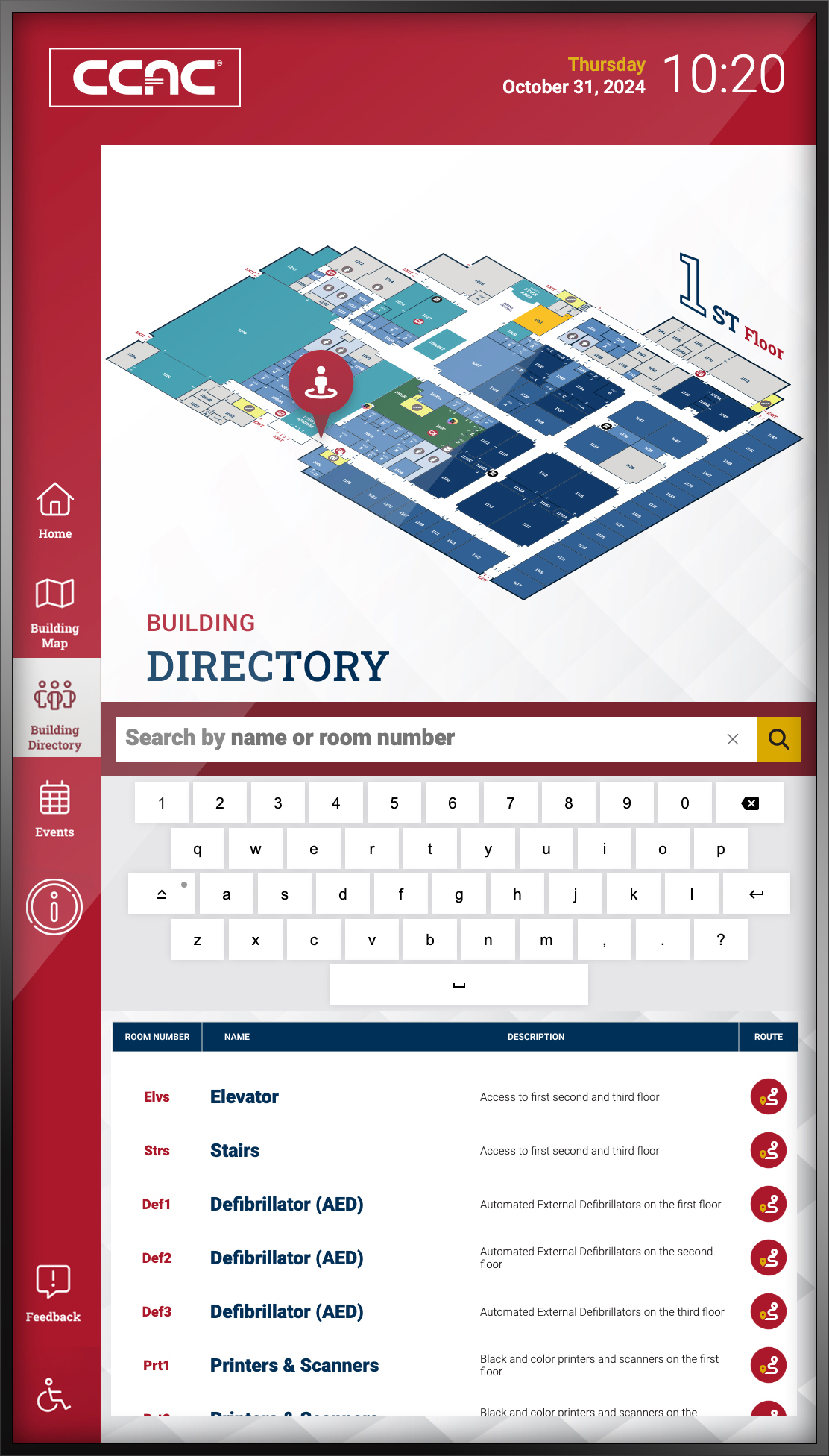
To improve how students and visitors navigate its campus buildings, CCAC sought a more effective, user-friendly wayfinding solution.
Their new digital signage system now features interactive maps, directories, event listings, and accessibility tools, all designed to make getting around easier and more engaging.
Below is a brief summary of the solution but we recommend viewing the entire success story here.
Introduction
CCAC enrolls about 30,000 students each year and offers over 130 academic and workforce programs.
To enhance communication and wayfinding across its campuses, Mvix created custom interactive digital templates.
These include screensavers, touchscreen building maps, visual directories, live event updates, and ADA-compliant features—each aimed at improving the campus experience.
The Challenge
Outdated static signage at CCAC was costly to maintain and often overlooked.
Physical maps and posters failed to capture attention, making it hard to share important information effectively.
Navigating the campus was a struggle for many, and engagement with existing signage was low.
CCAC needed a dynamic digital solution that was easy to update, eye-catching, and capable of providing insights into user interaction.
Deployment & Usage
Mvix started by assessing CCAC’s specific needs and designed a tailored digital signage system.
The rollout began at the West Hills campus, focusing on wayfinding tools enhanced with event listings and mobile-friendly QR codes.
Kiosks were strategically placed near building entrances to maximize accessibility and visibility for both students and visitors.
Why It Worked
After reviewing several vendors, CCAC chose Mvix for its comprehensive offering of software, hardware, support, and analytics.
The solution quickly proved effective, with hundreds of user interactions recorded within weeks.
Encouraged by these results, CCAC expanded the digital signage to additional campuses, with other departments now exploring new ways to utilize the system.

FETCO
FETCO realized they needed a better way of communicating with their employees. Specifically, with their production line employees.
They looked to digital signage to improve employee communications. Digital signage powered through Mvix offers a touchless real-time solution.
If you’d like to read the full case study, you can view and download it here.
Introduction
FETCO specializes in beverage equipment. They manufacture:
- coffee brewers
- hot water dispensers
- iced tea brewers
- coffee grinders
- frozen beverage machines
With customers and clients all around the world, their extensive sales network includes Asia and Pacific Rim, the Middle East, Africa, India, Europe and Latin America and the Caribbean.
FETCO was looking for an opportunity to improve their production and work more efficiently in their factory. They opted to try digital signage.
Opportunity for Digital Signage
Before FETCO implemented digital signage, they had relied on static communication such as a production sheets.
Employees would walk to one centralized location to check what task they needed to perform next. This was FETCO’s primary way of communicating with their production employees. This became a time consuming and costly process to relay information and updates in such a delayed way. Additionally, it required someone to manually check the sheet.
Implement digital signage has meant, that FETCO eliminated many touch points in their factory and head office. Presently, this is very important with the COVID-19 pandemic. Eliminating touch points reduces the risk of infection. Furthermore, it limits human interaction, which helps keep employees safe.
What needed to be done?
Improve internal communication by implementing a digital signage solution. Determine the locations for the digital signage displays as well as the number of displays needed.
Once implemented FETCO needed to manage the content on their digital displays content.
Utilize displays to inform employees while eliminating touch points.
Why It Worked
Our CMS saves them time! They are able to edit their displays from anywhere. As well as display the content on multiple screens at once.
The perfect solution tailored to them. Digital signage delivered increased productivity for FETCO from day one. They are able to spend less time on manual scheduling and more time on the actual product manufacturing

NASA’s SOFIA Program
The Stratospheric Observatory for Infrared Astronomy (SOFIA) program, a project of NASA, has implemented a digital signage network in their Ames Research Center located in Mountain View, California. Powered by the Mvix platform, their digital signage network consists of 5 screens across 3 of their facilities. The digital signage solution allows SOFIA program personnel to communicate easily, displaying flight and maintenance schedules, and day-of and post-flight activities.
Introduction
SOFIA is a Boeing 747SP aircraft modified to carry a 2.7-meter reflecting telescope, allowing astronomers to study the solar system and beyond. It is essentially a Flying Telescope. The airborne observatory is an 80/20 joint project of NASA and the German Aerospace Center (DLR) respectively. SOFIA is operated and maintained by NASA’s Armstrong Flight Research Center and its program, science, and mission operations are managed by NASA’s Ames Research Center and the German SOFIA Institute.
The Challenge
NASA’s SOFIA Program needed a user-friendly way to communicate across different locations. SOFIA goes on 10-hour flights, observing the infrared universe and gathering data for researchers to study. The growing program has created large program personnel across different locations. In order to operate efficiently and easily, NASA needed an effective communication strategy.
Prior to their digital signage implementation, NASA team members relied on their email and other systems to find information regarding the SOFIA program operations. This communication method took personnel away from their core job tasks in order for them to gain vital information on flight schedules, flight activities, and other functions.
Deployment & Usage
NASA’s SOFIA Program implemented a digital signage network of 5 screens across 3 facilities, all powered by the Mvix Digital Signage Platform. The Mvix solution offered a robust platform for NASA personnel to manage the displays and upload content remotely. This helped with efficiency as they did not need to be at each facility physically in order to update the displays. Their screen could be updated with the most up-to-date information from anywhere.
Why It Worked
The digital signage network helped SOFIA program personnel communicate more efficiently across their facilities, relaying important information about flight and maintenance schedules. As a result of the digital signage implementation, SOFIA program personnel noted more effective communication across their facilities. Team members know where they can find information quickly without having to log into their emails or any other systems. The easy-to-read screens quickly became their “go-to information hubs” for their maintenance and operation teams.
In fact, because of the effectiveness of their digital signage network, NASA will be adding another system in the German Aerospace Center (DLR) headquarters in Germany to further their communications regarding the SOFIA program.