
Setting Up The MS Sharepoint Integration
Sharing internal content across your organization shouldn’t require constant manual updates or extra steps.
With our Microsoft SharePoint integration for digital signage, you can automatically display documents, announcements, and files directly from your SharePoint libraries on your screens.
This seamless connection keeps your content current, improves internal communication, and ensures important information is always visible to the right audience.
What You’ll Need:
- An Active Mvix CMS Account
- Internet Connectivity
- An Active Select Suite Account
Getting Started
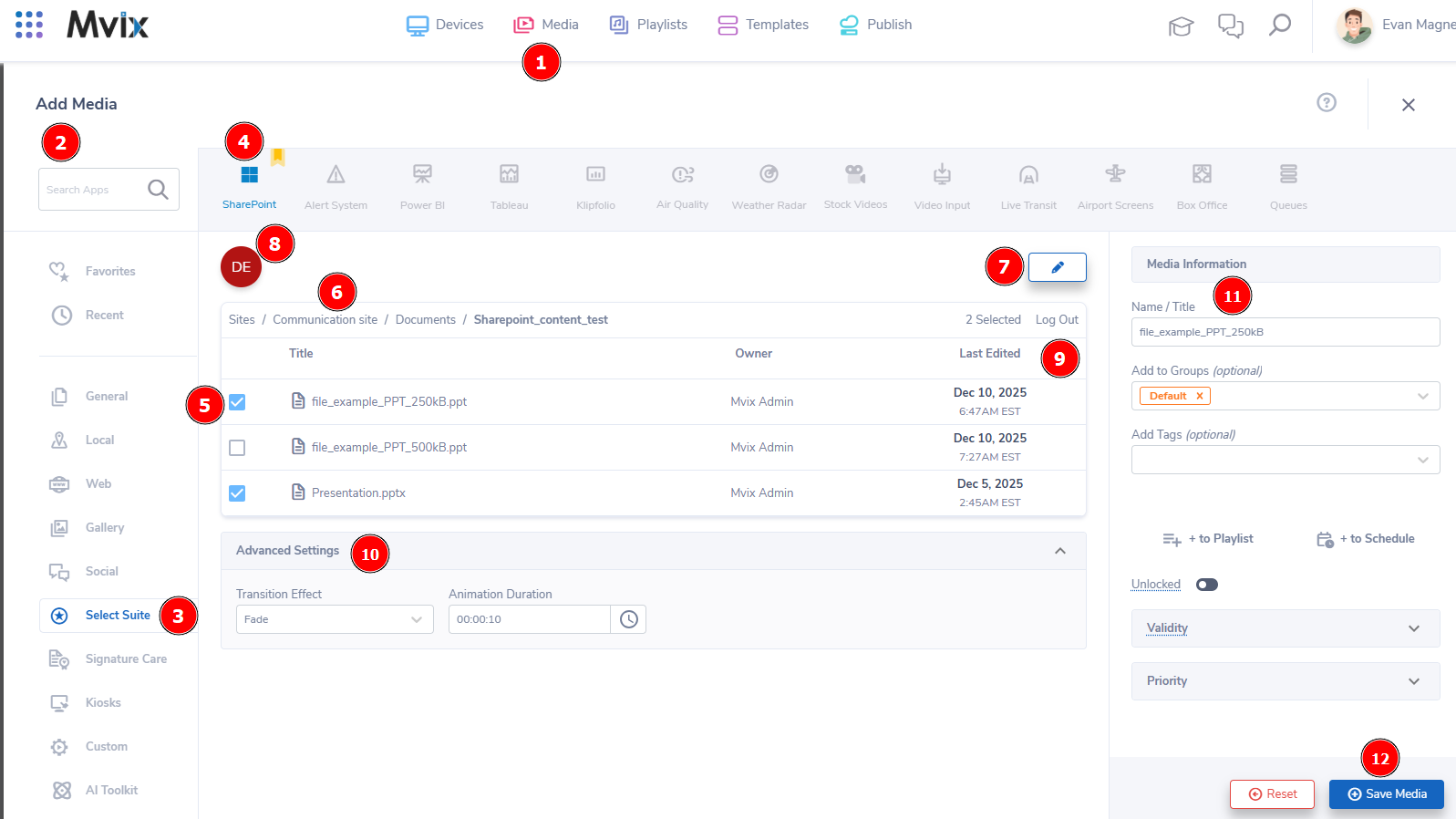
- From the Mvix CMS Dashboard, (1) hover over the "Media" module and select "Add Media"
- To get to the app, either search for it in the (2) search bar at the top-left, or you can (3) click on the "Select Suite" category, then (4) click on the Sharepoint app at the top of the module.
- First, you'll need to connect to your account. Click on "Connect To Microsoft Sharepoint" and log into your account from the popup.
- Once the integration is setup, all your Sites should appear in the module.
- Simply click through the sites you'd like and then (5) select the files from Sharepoint you would like to connect to Mvix CMS.
- If you need to go to the parent folders, (6) click the desired location at the top-left.
- To add more Sharepoint Accounts, (7) click on the pencil button at the top-right and complete the login process again.
- To switch between accounts, (8) click on the icon at the top-left. To (9) log out of an account, click the "Log Out" text at the top-right.
- Once you have selected your files, you can customize the duration & transition under (10) Advanced Settings.
- If you are satisfied with all the files you'd like to associate, be sure to (11) give an easy to reference name and then (12) click "Save Media" to add them to Mvix CMS.
Digital Signage Forever
Designed for enterprise-digital signage deployments, our Signature 360 plan offers a lifetime warranty, free digital signage players every 3 years, accelerated issue resolution, and premium content. Intended to enable high system uptime, operational efficiency, and continuous business innovation, the plan ensures proactive upkeep of the signage network. Learn more about Mvix Signature 360.